- Type
- Tool, flagship
- Platform
- Windows, local-first
- Source
- Private
AEGIS v2
A local-first Windows workbench that runs a pentest engagement end to end: scoping, scan import, findings, methodology and reporting, with Claude Code docked inside it. Claude reaches engagement data only through a masking boundary that fails closed.
![AEGIS dashboard with KPI tiles and a recent-projects table, and a docked Claude Code terminal summarising findings using placeholders such as [CLIENT] and [HOSTNAME-3].](/_astro/dashboard-claude.BUF-OLUb_ur9L8.webp)
The problem
An AI assistant is useful during a penetration test: triaging scan output, drafting findings, writing one-off tooling. But engagement data belongs to the client. Hostnames, address ranges, usernames and credentials cannot be pasted into a third-party model.
A rule that depends on the tester remembering that every single time will eventually fail. AEGIS moves the rule out of the tester's head and into the architecture.
What it does
- C-01
Engagement management
Clients with a logo, brand colour and notes. Projects are grouped into engagements with a structured report ID (CLIENT-PROJECT-TYPE-DATE-V1.x). Retest versioning carries findings into a new version and matches them automatically, so what was fixed is visible at a glance.
- C-02
Scope and assets
In-scope entries and exclusions, a host:port inventory with test status per port, an endpoint and API catalogue, and stored project credentials.
- C-03
Findings
Severity, status, CVSS vector and score, CWE, OWASP category, impact, remediation and revised scoring. Evidence as HTTP request and response pairs or file uploads. Tags, a triage log, grouping under a parent finding, CSV import and export, and a reusable template library that auto-fills from Nessus plugin IDs.
- C-04
Methodology checklists
Checklists tied to each assessment type, with eight types seeded. Each item is marked pass, fail or not tested, can carry evidence and a linked cheatsheet, and becomes a finding in one click.
- C-05
Scan importers
Nessus (credentialed-check status per host, retest comparison), Nmap (fills in scope automatically), testssl.sh, Burp XML and MobSF. Plus a JWT analyzer (alg=none, weak-secret cracking, jku and kid injection) and a live security-headers scanner guarded against SSRF.
- C-06
Reporting
A section-based WYSIWYG template editor with branding: cover, logo, accent colours, watermark and custom CSS. Exports to DOCX, XLSX and HTML, plus a separate methodology report.
- C-07
Planning and collaboration
A dashboard of reorderable widgets (findings trends, top CWEs, CVSS distribution, workload), tasks and a calendar, port cheatsheets, roles and project membership, a read-only client portal, a REST API, and Slack or Telegram notifications.
- C-08
Data portability
Selective JSON export and import, a full ZIP backup with a reminder when one is overdue, and an updater that installs from a local folder after checking the installer's SHA-512. There is no cloud update server.
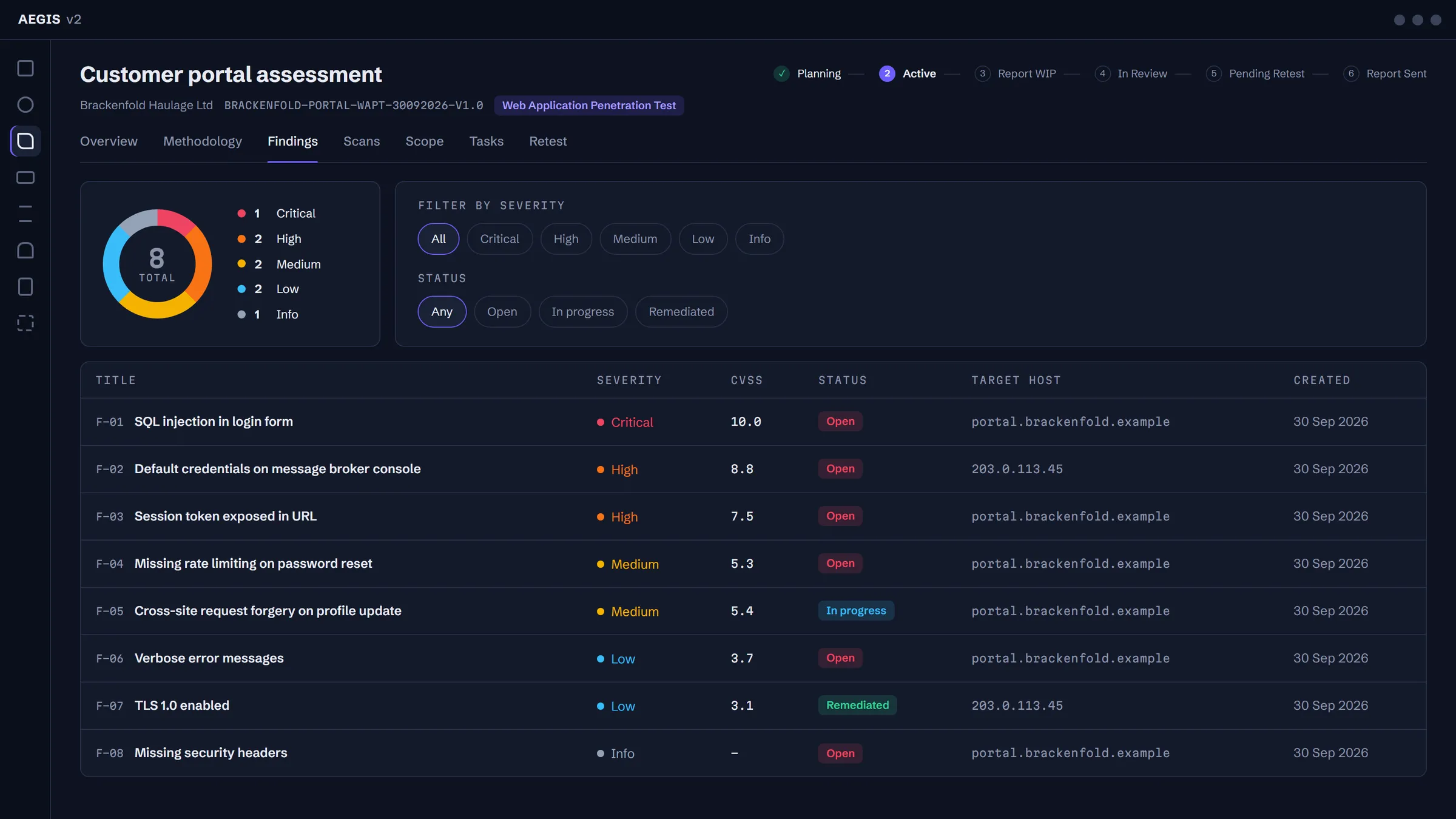
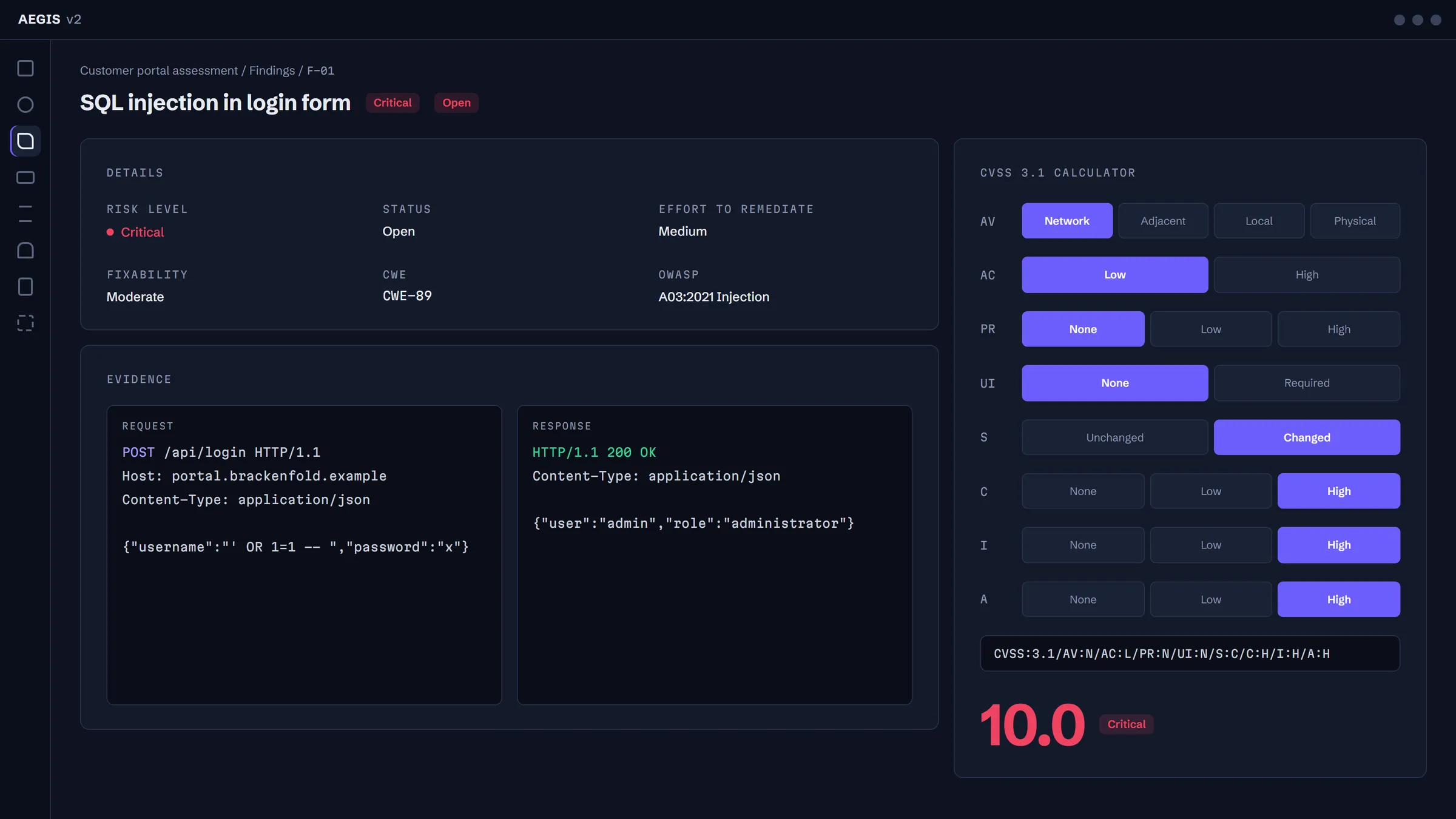
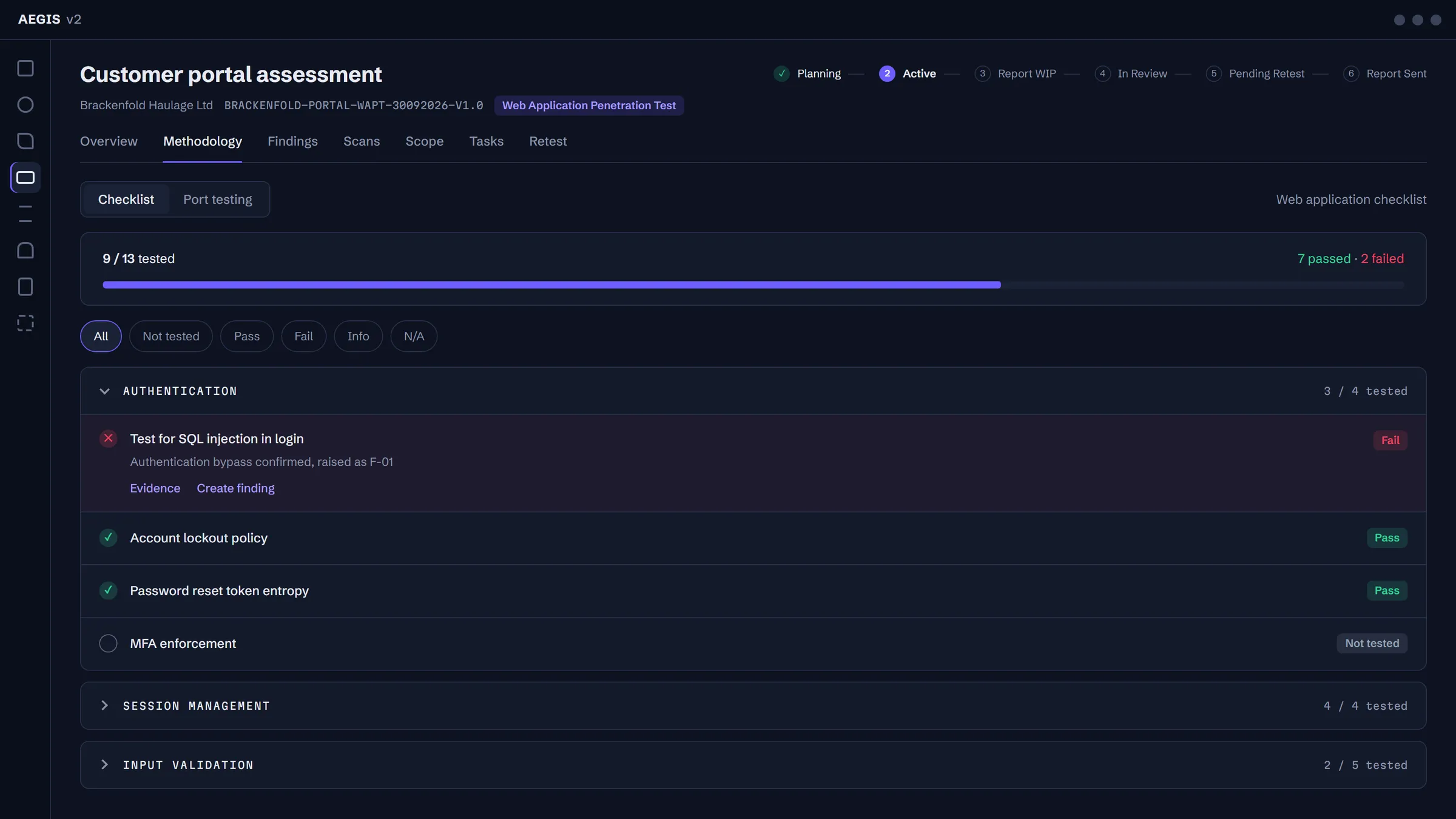
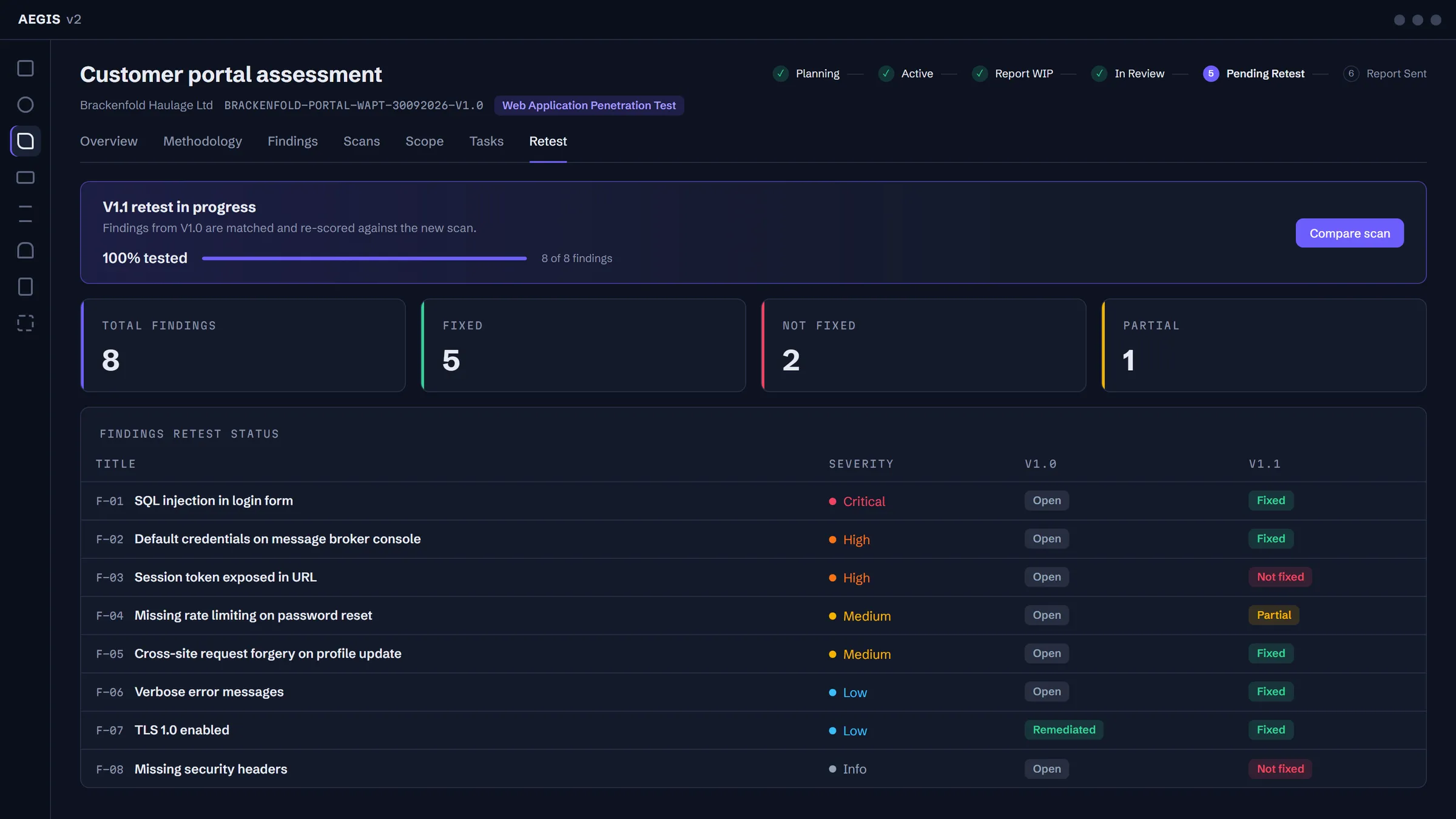
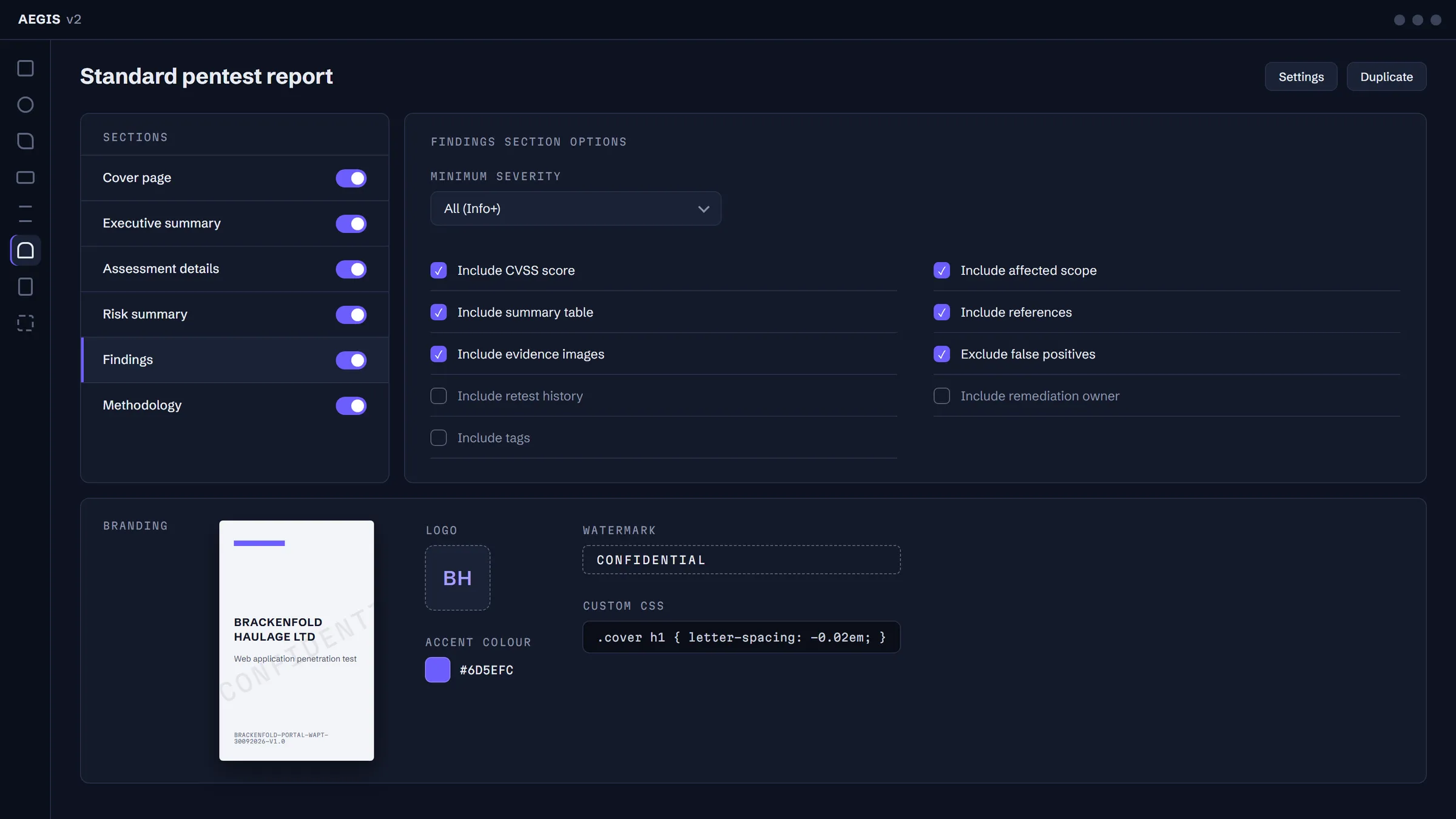
All figures are interface renders with fictional data.
Architecture
- Claude Code runs in a real PowerShell terminal docked beside the app.
- The AEGIS data server is its only way into engagement data, and every response passes through the masking boundary.
- Engagement data stays in a local SQLite store with its real values.
- Burp Suite MCP is a separate, opt-in channel to a remote Kali box over an SSH tunnel. It does not pass through the masking boundary.
The masking boundary
Real client values are replaced with placeholders such as [CLIENT], [HOSTNAME-3] and [PUB-IP-1] before anything reaches the model. Tokens and Authorization headers become [REDACTED-TOKEN]. The assistant can still reason about the engagement; it just never learns whose engagement it is.
The boundary fails closed. Every tool response is scanned before it leaves AEGIS, and if any real value slipped past the mask, the whole response is withheld. On the way back in, a write that references an unknown placeholder is refused.
The design is candid about its trust model: the boundary protects what AEGIS serves, and nothing else. That is why Burp is drawn outside it.
| Client | Brackenfold Haulage Ltd |
|---|---|
| Host | portal.brackenfold.example |
| Public IP | 203.0.113.45 |
| Note | TLS 1.0 still enabled on 203.0.113.45 |
| Contact | d.ferrow@brackenfold.example |
| Auth header | Bearer eyJhbGciOiJIUzI1NiJ9.eyJzdWIiOiJkZW1vIn0 |
| Unmasked value | Response withheld. Nothing crosses unmasked. |
The assistant, in practice
Claude Code runs in a real PowerShell terminal docked beside the app. It is not a chat widget.
An Ask Claude button passes the project or finding you have open into the prompt. After Claude changes something, a banner offers to reload the page.
- > Summarise the critical findings.
- > Which hosts have the most issues?
- > Draft remediation for this finding.
- > Suggest next testing steps for these open ports.
Claude has about a dozen MCP tools. It can read findings, scans, hosts and methodology, read and write notes, and group findings with a dry-run preview first. Its only way to change the database is update_finding, which accepts a whitelist of fields and logs every change.
Burp Suite without the plumbing
Pairing an assistant with Burp Suite normally means starting an MCP server, opening an SSH tunnel to the testing box and keeping both alive by hand. AEGIS manages the tunnel to a remote Kali box itself, with keep-alive and reconnect.
It is a separate, opt-in channel: Burp's feed goes to Claude directly and is not masked. Only the AEGIS data server sits behind the boundary.
Built with
- Shell
- Electron with a sandboxed web view (context isolation, no preload)
- Terminal
- node-pty and xterm.js
- Backend
- Flask and SQLite, packaged with PyInstaller and served on a random loopback port
- MCP server
- The same backend binary started in MCP mode, reading the database read-only
- At rest
- Warns at startup if the data drive isn't protected by BitLocker
- Network
- No telemetry and no cloud backend
| Suite | Tests |
|---|---|
| Backend and MCP (pytest) | 111 |
| JS unit | 49 |
| End-to-end (Playwright) | 29 |
| Total | about 190, including dedicated masking tests |
Design decisions
- Local-first
- Engagement data lives on the operator's machine. Nothing is synced anywhere by default.
- One door, enforced by the interface
- The assistant reaches data through MCP tools rather than files, so the boundary is enforced by the architecture instead of by discipline.
- Fail closed
- When in doubt, withhold. Unmasked values never cross.
Status
The source is private, so this page covers the story and the architecture only. I'm happy to walk through the design in more depth in conversation.